
Skip to content
Three colleagues, from sales, support and management, gathered around the same laptop in a sunlit office

Neoo Platform: Each tool sees one piece. Neoo connects the whole.

Sales, projects, support, billing: in Neoo, everything links back to the same customer. Everyone sees the context they need, and nothing is retyped from one team to the next.

Neoo Free, then Neoo Lite at €9 / company / month and Neoo Lite Pro at €19 for 3 users, hosting included. Neoo Business: from €199 per month excl. VAT with 3 users and a dedicated Cloud, 30-day free trial.

  • Sales
  • Quotes
  • Projects
  • Support
  • Billing
  • Scheduling

01 / What gets lost between teams

Each team holds part of the information. Nobody has the whole picture.

  1. “Does this customer have unpaid invoices?”

    TodaySales calls them without knowing: the answer sits with accounting.

    With NeooOn the customer record: paid and pending invoices, with their total.

  2. “The quote is signed. What now?”

    TodaySales tells the team by email, and the order is typed in again.

    With NeooThe signed quote becomes an order, linked to the quote and one click away.

  3. “Does support know this customer?”

    TodayThe technician replies without seeing the record, the terms or the history.

    With NeooThe ticket is linked to the customer: their record opens without leaving the request.

  4. “Were these hours invoiced?”

    TodayTime spent sits in a spreadsheet and turns up at month end.

    With NeooBillable time lands in pending billing, with its customer and its amount.

Common situations in a small business, shown as examples: they are not testimonials.

02 / Inside Neoo

One customer. The whole business around them.

Four real Neoo Business screens, four teams. They work on the same customers: what one records, the other finds. Names, amounts and contact details are fictitious; the rest is the application as it works.

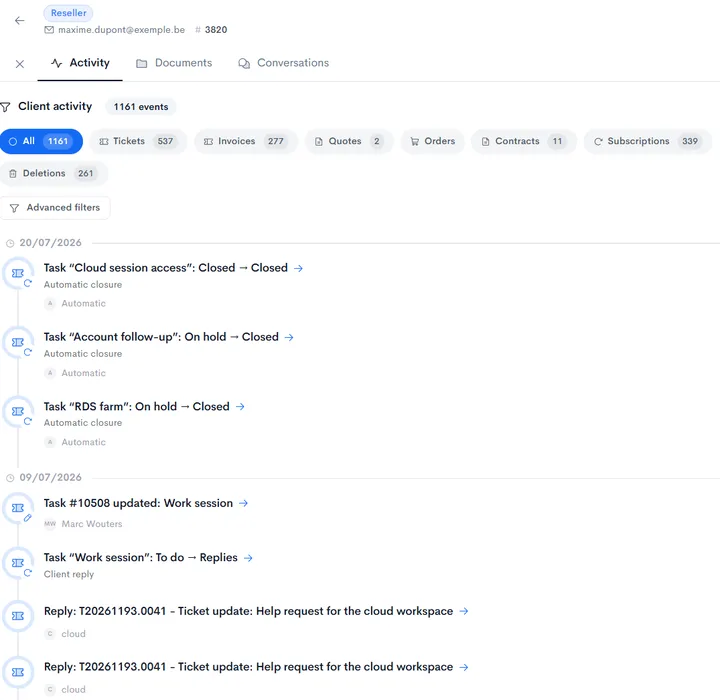
Customer history in Neoo: filters by event type and a timeline of requests with their status changes.
Real Neoo screen · customer data anonymised

Sales / HISTORY

Everything that happened with this customer.

Requests, invoices, quotes, orders and contracts: the customer’s activity reads on one timeline, filtered by type. Whoever picks up the account knows where the relationship stands.

  • Every event dated, with its author
  • Filters by event type
  • Status changes kept on record

See CRM and sales

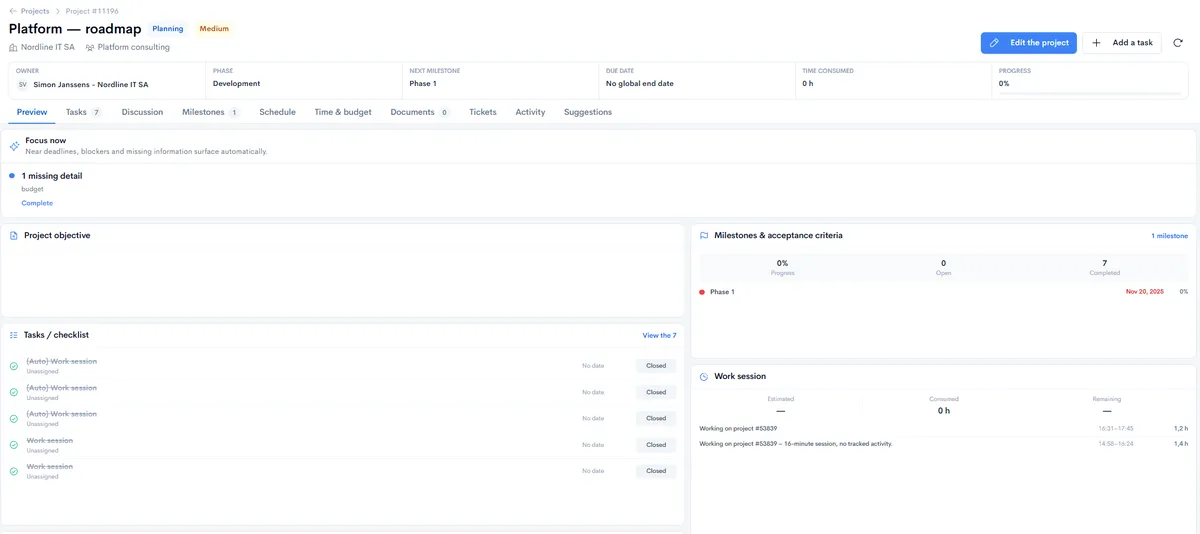
Project record in Neoo: owner, phase, next milestone, due date, time consumed and progress, then Focus now, tasks, milestones and work sessions.
Real Neoo screen · customer data anonymised

Operations / THE PROJECT

The whole project on one page.

At the top: owner, phase, next milestone, due date, time consumed and progress. Just below, the Focus now block surfaces near deadlines, blockers and missing information. Tasks, milestones and work sessions read on the same page.

  • Missing information flagged on its own
  • Milestones with their acceptance criteria
  • Work sessions listed on the project

See projects and time

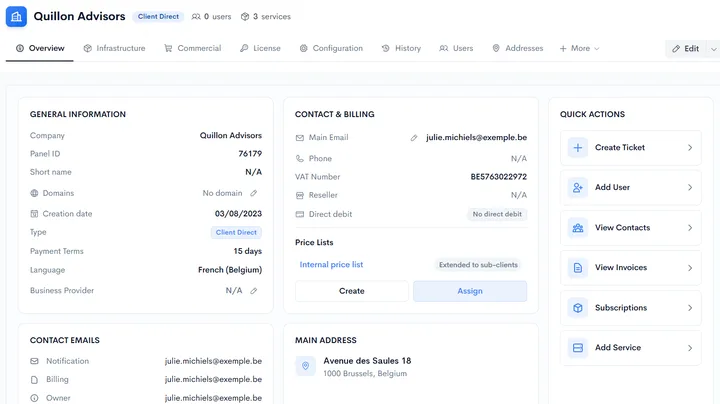
Client Information tab of a ticket in Neoo: general information, contact and billing, price lists and quick actions.
Real Neoo screen · customer data anonymised

Support / THE CUSTOMER

The customer record, without leaving the request.

The Client Information tab shows the record inside the ticket: contact details, payment terms, price list, address and contact emails. Quick actions create a ticket, add a user or add a service.

  • The customer’s contact details and terms
  • The customer’s contact emails, by role
  • Quick actions: ticket, user, contacts, invoices, service

See customer support

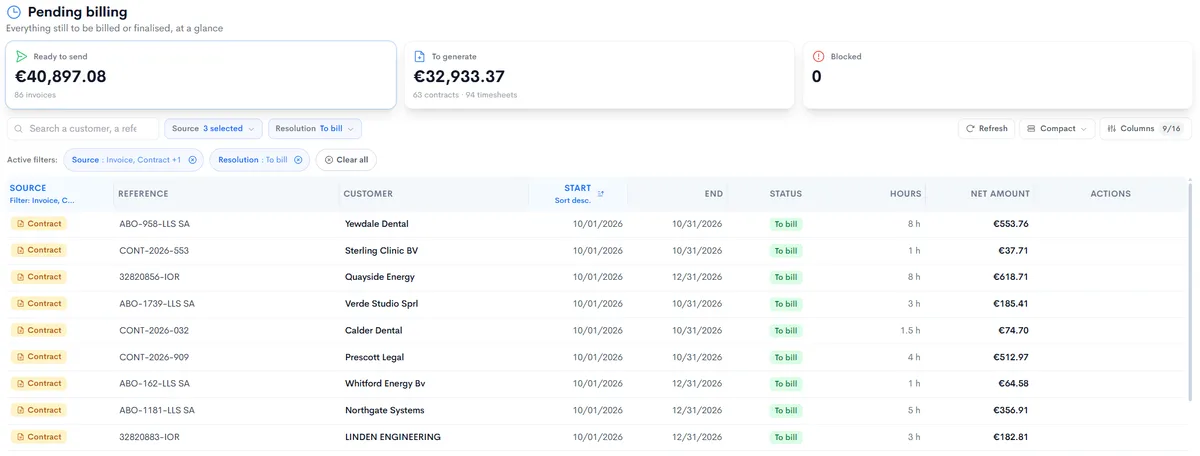
Pending billing in Neoo: amounts ready to send, to generate and blocked, then the list of contracts and hours to invoice, customer by customer.
Real Neoo screen · customer data anonymised

Billing / TO INVOICE

Everything still to invoice, in one place.

Pending billing gathers the invoices ready to go out, the contracts and the hours still to invoice. Filter by source or search for a customer: nothing stays forgotten in a spreadsheet.

  • Amounts ready to send, to generate or blocked
  • Contracts and hours, with their customer, duration and amount
  • Filters by source and by status

See quotes and invoicing

03 / The journey

A request moves through the business. Nothing is retyped.

  1. Request

    A customer email becomes a ticket, linked to their record.

  2. Tasks

    Work is split into tasks, each with its team and assignee.

  3. Time spent

    Time is captured in sessions, linked to the ticket and the task.

  4. Approval

    The manager approves timesheets, with the amount of each line.

  5. Billing

    Billable time lands in pending billing, with its customer.

Example journey with Neoo Business, to adapt to your team.

04 / Control

AI proposes. You decide.

Neoo Commander is the agent that keeps watch over your business. Within the permissions you define, it spots a missed deadline and prepares the follow-up; every action stays traceable.

Neoo Commander is an option for the Business and MSP plans.

Discover Neoo Commander

Before automating, set the rules

  1. Observe

    A useful signal is spotted in the available context.

  2. Propose

    An option and its consequences are presented clearly.

  3. Approve

    The accountable person accepts, adjusts or rejects it.

  4. Execute

    Authorised actions run in the right order.

  5. Trace

    The context, the decision and the result remain available.

Illustrative principle: access, approvals and records are defined with you, according to your plan.

05 / Choose your plan

One foundation, several ways to start.

To get started

Neoo Lite

€9/ company / month, one user, hosting included

Quotes, invoices, customers and Peppol, with no infrastructure to manage. Start free with Neoo Free, or move up to Neoo Lite Pro: 3 users for €19 a month.

Discover the plan

For the whole team

Neoo Business

€199per month with 3 users and a dedicated Cloud S, then €59 per user

The Neoo Business pack: €199 per month with 3 users and a dedicated Cloud S, then €59 per additional user. Neoo Scheduling included, Peppol built in. Options and onboarding are extra. 30-day free trial.

Discover the plan

To build your applications

Neoo Forge

€99per month, your Forge application on Neoo Cloud

Missing an application? Describe it in your own words: Forge, Neoo’s workshop, assembles it with AI. Free up to 10 credits a month, renewed monthly, no subscription: what you build is paid according to its hosting.

Discover the plan

Prices exclude VAT.

Do you manage your customers’ IT? Neoo MSP is built for IT service providers, billed per technician.

Discover Neoo MSP

Data, access and operations

Choose a clear scope for your data.

Check hosting, access, support and exit arrangements for the offer you choose. A capability of a Forge project is not automatically included in Business or MSP.

Business and MSP

Have your proposal specify the hosted services, data locations, access, backups and support. An offer name alone does not establish support hours, an availability target or a retention period.

Compare the uses and prices

Forge: what each use includes

These rows reproduce the commercial scope published for building with Forge, a website and an application. They are not a certification, an audit of your environment or a shared service commitment for every Neoo offer.

On a small screen, scroll the table horizontally. With a keyboard, focus the table and use the arrow keys.

Hosting, access, exports and support by Forge use
CapabilityForgeWebsiteApplication
Hosting and deploymentsPublishing through a website or an applicationWeb hosting includedHosting S to XL, 100 GB included
Security and accessTo be specified for your projectTo be specified for your projectRoles and access to define for your project
GitHub and exportsTo be specified for your projectTo be specified for your projectFormats to agree for your project
SupportDocumentation and guidance on requestAccording to your offerAccording to your offer

“To be specified” means neither included nor unavailable. No availability target or response time is set here. Agreed exports alone do not establish that an entire application can be migrated.

See hosting and prices

Agree these points before going live

Use this checklist to define your proposal and each party’s responsibilities. These are points to verify, not services added to your subscription by default.

  1. Hosting and data flows

    Identify the services used, hosting and backup locations, the parties involved and any transfers to third-party services.

  2. Access and responsibilities

    Define roles, access administrators and required approvals. Check which authentication mechanisms your offer provides.

  3. Backup and recovery

    Agree the frequency, retention, backup scope, restoration tests and recovery objectives suited to your business.

  4. History, incidents and support

    Specify the events retained, retention periods, who can access them, the incident contact, support hours and escalation process.

  5. AI and integrations

    List the data sent, permissions and exchange directions. Review how the services concerned process, retain and use that data.

  6. Exports and contract end

    Define the data and files you can retrieve, formats, deadlines, any assistance, costs, and retention or deletion arrangements after exit.

Your application and this website are different scopes

This reference helps you choose an offer. For information about data collected on neoo.io and requests sent to the team, read the privacy policy. Commitments specific to your environment need to be set out in your offer and contractual documents.

Frequently asked questions

Does Neoo Platform replace all our tools?

Not necessarily. You can start with one specific journey and keep your tools alongside. Any replacement is decided later, according to value and your priorities.

Do we need to model everything before starting?

No. Start with a few real customer files and one concrete journey, then add the other teams progressively.

How do teams see the data?

Define who may view, edit and approve data. Check the mechanisms available in your plan and test access before going live.

Can an automated proposal act on its own?

Agree permitted actions, human approvals and the records to retain according to your plan’s capabilities. Neoo Commander acts within the permissions you define, and every action stays traceable.

What is the difference between Platform, Business, Forge and Exchange?

Platform is the common foundation. Business provides ready-to-use processes, Forge enables application building and Exchange helps people discover extensions and expertise.

Can the platform evolve with our business?

Yes. The model is designed to add new processes, teams and applications progressively on the same foundation.