

Skip to content
An IT service provider technician on the phone with a client, in front of his laptop, in a sunlit office; a colleague walks past a server rack

Neoo MSP · for IT service providers: Ten clients, ten environments. One place to serve them all.

Every client’s tickets, servers, licences, contracts and invoices are connected in Neoo. The technician who opens a request already sees the client, their environment and their history.

From €116 per technician / month See pricing

€1,392 billed per technician per year. Excluding VAT; options priced separately. Unlimited clients and endpoints.

  • Signal
  • Client
  • Ticket
  • Intervention
  • Time
  • Invoice

01 / What costs you time

Every client has its own tools. Your team runs from one to the next.

  1. “Which client is this server?”

    TodayThe alert lands in one tool, the contract in another, the ticket in a third.

    With NeooThe server belongs to its client: environment, contract and tickets are all reached from the client record.

  2. “Who is handling this request?”

    TodayEvery client’s emails land in the same inbox, with nobody in charge.

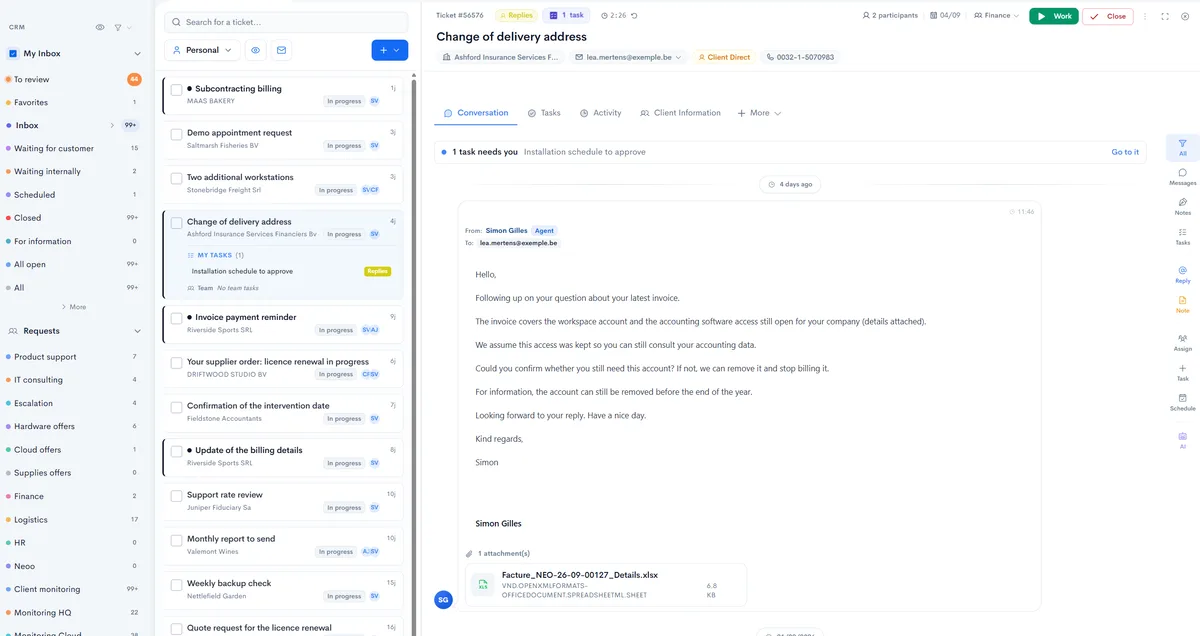
    With NeooEach request becomes a ticket for the client, filed in its queue, with its tasks and its owner.

  3. “Did we invoice that licence?”

    TodayLicences added mid-month are forgotten when it is time to invoice.

    With NeooEach client’s subscriptions are listed with their billing cycle and their due date.

Common situations at an IT service provider, shown as examples: these are not testimonials.

02 / Inside Neoo

What your technician sees, screen by screen.

Five real Neoo screens, from the ticket inbox to the client’s licences. Names, amounts and contact details are fictional; the rest is the application as it works.

The Neoo ticket inbox: queues by request type, tickets from several clients and an open conversation with the client’s context
Real Neoo screen · customer data anonymised
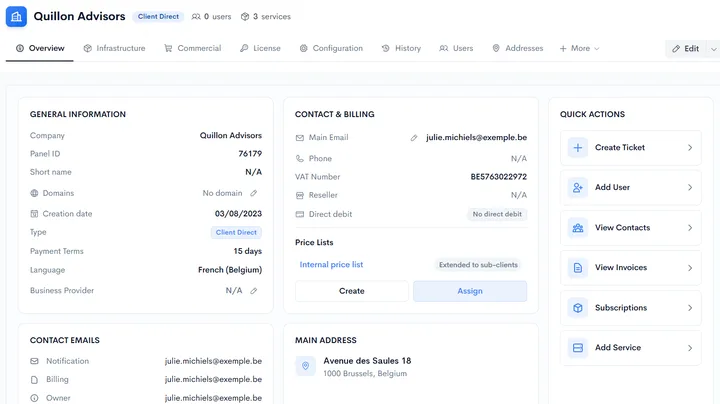
A client record in Neoo: general information, contact and billing, price lists and quick actions
Real Neoo screen · customer data anonymised

The client record

Every client, with all its context.

General information, contacts, billing and price lists: the client record also opens onto their infrastructure, licences, history and users.

  • Create a ticket or add a user from the record
  • A price list extended to sub-clients
  • Separate emails for notifications, billing and the owner
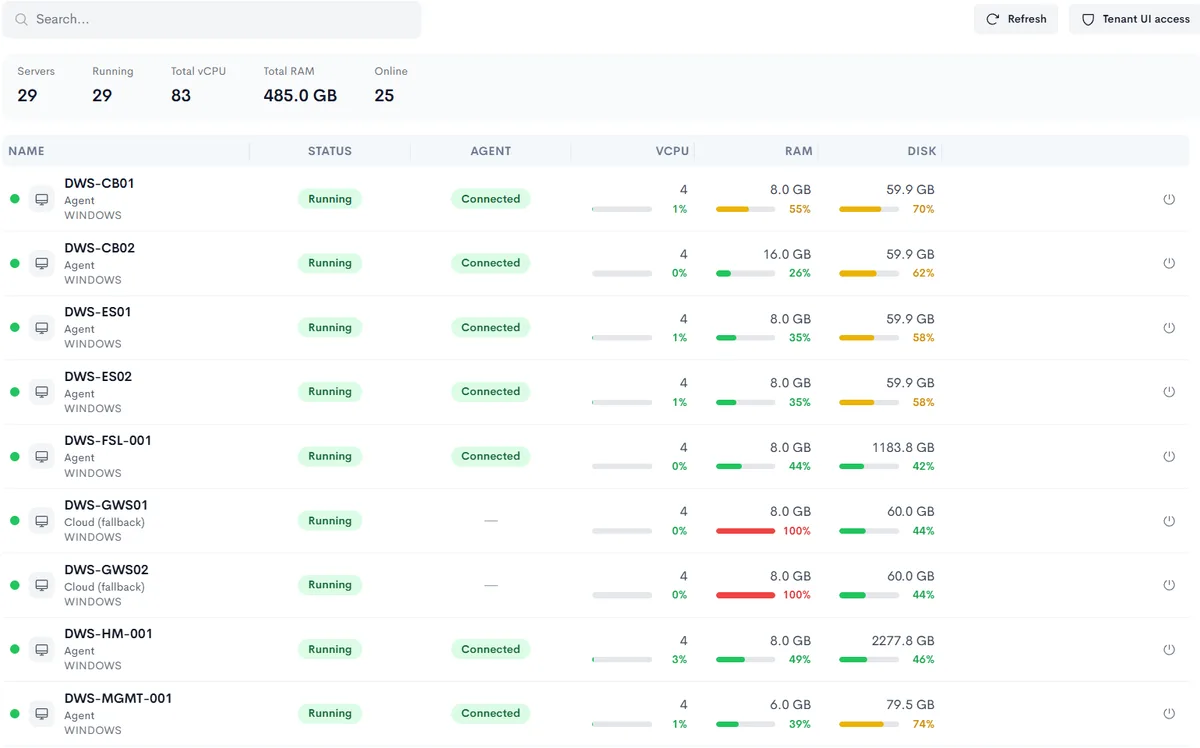
A client’s infrastructure in Neoo: list of servers with their status, agent and processor, memory and disk usage
Real Neoo screen · customer data anonymised

The environment

The client’s servers, in plain sight.

For each client, Neoo lists the servers with their status, the agent connection and the processor, memory and disk usage. A saturated memory stands out at a glance.

  • The status of each server and its agent
  • vCPU, RAM and disk, with their usage
  • Direct access to the tenant interface
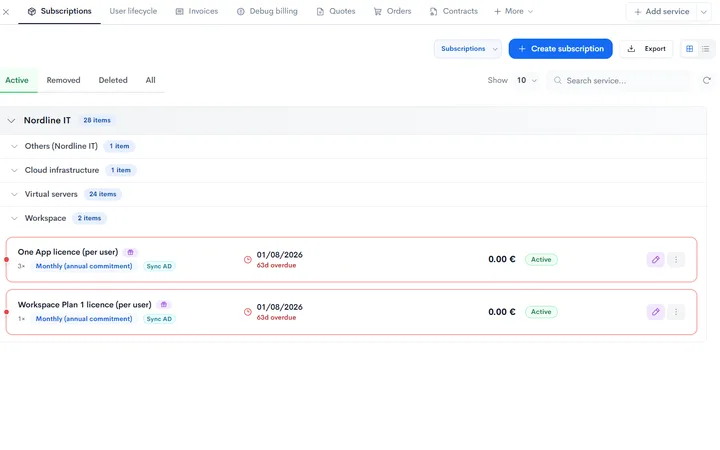
A client’s subscriptions in Neoo, grouped by service, with quantity, billing cycle and due date for each licence
Real Neoo screen · customer data anonymised

Licences and subscriptions

What each client uses, and what they pay.

The client’s subscriptions are grouped by service: workspaces, virtual servers, cloud infrastructure. Each licence shows its quantity, its billing cycle and its next due date.

  • The billing cycle on every line
  • Overdue renewals flagged in red
  • Licences synchronised with Active Directory marked
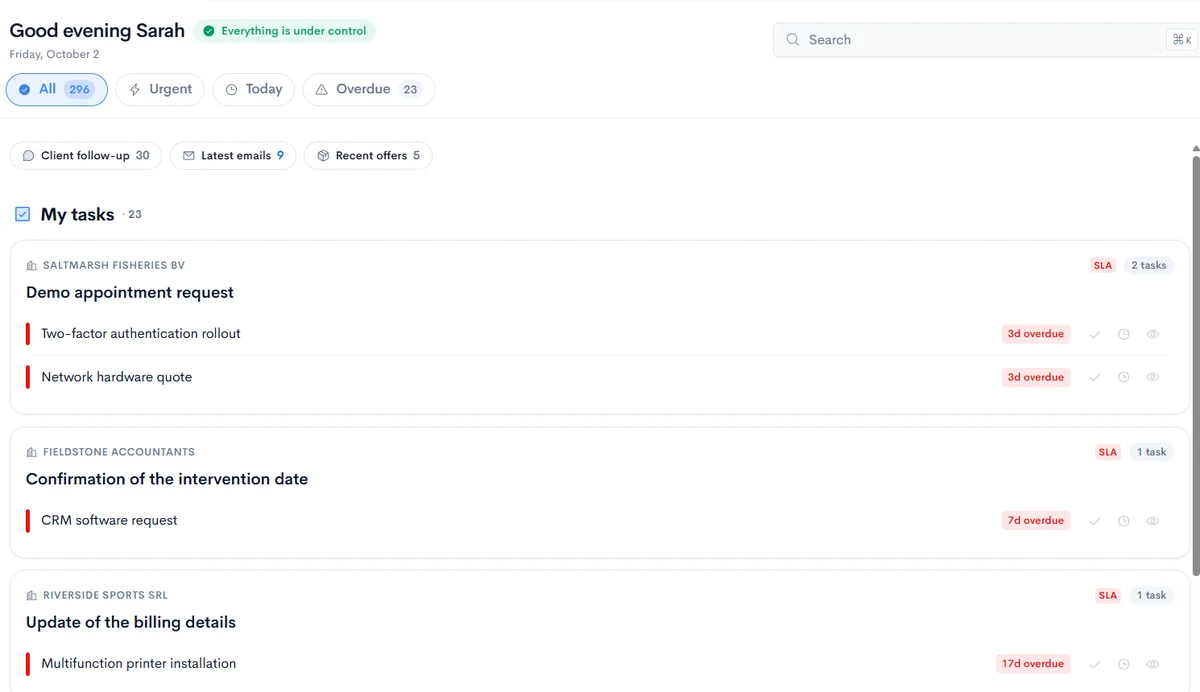
A technician’s dashboard in Neoo: tasks grouped by client, with SLA and overdue work flagged
Real Neoo screen · customer data anonymised

Your day

Every client’s urgent work, in order.

The technician’s dashboard gathers their tasks, client by client. Requests under an SLA and overdue work are flagged; the Urgent, Today and Overdue filters sort the rest.

  • Tasks grouped by client and by request
  • Overdue work and SLA visible on every request
  • Client follow-up, latest emails and recent offers one click away

03 / One incident, end to end

From signal to invoice, without switching tools.

  1. Signal

    The signal is linked to SRV-01 and its client. Diagnosis starts with the relevant history.

  2. Context

    The technician checks the contract, affected devices and previous interventions.

  3. Ticket

    The ticket gathers the useful information and identifies who owns the next step.

  4. Intervention

    Neoo Commander can prepare an action. The technician approves it when permissions or scope require it.

  5. Time

    The intervention and recorded time are linked to the ticket and contract for follow-up.

  6. Invoice

    Billable items are prepared according to the contract. Your team checks them before issuing the invoice.

Example journey: the functions included depend on the MSP level you choose and are to be confirmed with your team.

04 / MSP pricing

One clear price per technician.

Pay only for the technicians who use Neoo. Add clients, PCs, servers and other monitored equipment without increasing the price of your main subscription.

  • Unlimited clients
  • Unlimited PCs and servers
  • Fixed price per technician
Neoo MSP billing period

The displayed prices apply to an annual commitment, billed in one payment for twelve months.

Neoo MSP Core

€116per technician / month

Annual commitment — billed annually

€1,392 billed per technician per year

Save €156 per technician per year

The MSP entry price. Check the features required for your first client workflow.

Neoo MSP Advanced

€159per technician / month

Annual commitment — billed annually

€1,908 billed per technician per year

Save €240 per technician per year

Another pricing level to compare against the features and options agreed for your team.

Neoo MSP Premium

€188per technician / month

Annual commitment — billed annually

€2,256 billed per technician per year

Save €252 per technician per year

A level to evaluate against your exact scope, without inferring guarantees from its name.

Neoo MSP Enterprise

Custom pricing

For complex environments, specific contractual requirements and large-scale deployments.

Talk to the Neoo team

Minimum: 1 technician. Prices exclude VAT. Annual billing is one payment for twelve months, not monthly instalments. Confirm renewal, plan changes and cancellation terms before ordering. Level prices are defined; their functional differences must be specified in your offer. No level is recommended solely on its name or price.

Configure your Neoo MSP subscription

The main price depends only on the level, billing period and number of technicians.

The calculator is currently unavailable. View the annual prices above or contact our team for an estimate tailored to your needs.

Billing period
Neoo MSP billing period

Monthly equivalent€159

Annual subscription billed in one payment€1,908

Annual commitment — billed annually

Excluding VAT; options priced separately.

Inclusions and scope to confirm for each level

Only established inclusions are marked as included. ‘To confirm’ does not mean ‘unavailable’: ask for each level’s features, options, quotas and activation requirements before choosing.

FeatureCoreAdvancedPremiumEnterprise
Multi-client managementIncludedTo confirm
CRM and salesTo confirm
Offers and contractsTo confirm
Support and ticketingTo confirm
Interventions and timeTo confirm
Licences and provisioningTo confirm
MonitoringTo confirm
BillingTo confirm
PeppolTo confirm
Client portalTo confirm
ProjectsTo confirm
DashboardsTo confirm
AutomationsTo confirm
Platform updatesTo confirm

Scroll the table to the right to see the Advanced, Premium and Enterprise levels.

The main subscription does not automatically include third-party licences, security, backups, additional storage, Neoo Commander, Desktop & Apps or Forge. Separate these costs from one-off migration and any ongoing guidance.

05 / Getting started

A first ticket linked to the right client.

Validate this workflow with a pilot before extending deployment. This is a suggested starting point, not a product activation performed by this website.

  1. Choose a pilot client

    Prepare the client record, relevant contract and a representative request. Check the data to import and access permissions.

  2. Follow an intervention

    Agree how the client, ticket, owner and recorded time connect. Verify which functions are available in the chosen plan.

  3. Check before billing

    Review billable items and what the contract covers. Then extend the workflow to other clients and validated tools.

Change MSP plans based on confirmed functions and terms. Business serves company-wide management; MSP serves multi-client IT services. This is not a universal upgrade ladder.

Options and connections

Connect only what has been confirmed.

A connector’s status does not prove it is included in your MSP plan. Peppol is listed as available in the catalogue; activation, limits and prerequisites still need confirmation for your offer. The other connections below require validation.

Catalogue availability; inclusion to confirm

  • Peppol

Connections possible after validation

  • Microsoft
  • Acronis
  • OVHcloud
  • TD SYNNEX

Scenario to validate

A Microsoft 365 order can prepare everything that follows.

An example to validate against the Microsoft 365 connector, licences, APIs and permissions available. Neoo Commander is an option at €99 / month; appearing in this scenario does not make it part of the MSP subscription.

  1. 1Add the licencePrepared
  2. 2Create the userExternal approval
  3. 3Attach to the contractInside Neoo
  4. 4Prepare recurring billingInside Neoo
  5. 5Notify the customerAfter approval

Client portal

One portal for every customer.

This view illustrates information a client could access. Confirm portal inclusion, enabled functions and access rights for the chosen plan and project.

Using another tool?

Answers before an MSP demo.

Are clients and tenants billed separately?

Not in Core, Advanced or Premium: the main price depends on the plan, billing period and number of technicians.

Are monitored PCs and servers billed separately?

Not in the main subscription. Third-party licences, security, backups, storage and additional services may be billed separately.

What is the difference between monthly and annual billing?

Monthly: paid each month, no annual commitment. Annual: a reduced price, paid once for twelve months.

Can I change MSP level?

Confirm functions, change terms and billing before activation.

Is there a limit on the number of devices?

Clients and endpoints are unlimited in the main pricing model. Specific contractual needs require Enterprise scoping.

Are the client portal and Peppol included?

Confirm inclusion, activation and limits. An illustration or connector availability is not proof of inclusion.

Are Neoo Commander, Desktop & Apps and Forge included?

Neoo Commander: €99 / month as an option. Desktop & Apps: MSP option. Forge: 10 free credits a month, then one-off packs. Neoo Accounting requires Business and Desktop & Apps, not MSP.

Is the Microsoft 365 integration available?

Validate the connector, licences, APIs and permissions. Confirm activation for your environment.

Can I migrate from an existing PSA?

Assess the available exports and history. Scoping, migration and training are priced separately, not automatically as recurring services.

What support and hosting terms apply?

Confirm support, hosting, security, exports and exit terms in your offer. Price alone guarantees no service level.